
If you’ve ever felt like your Shopify store is a bit “boxed in” by its theme, you’re not imagining it. Shopify is great out of the box; it’s fast, reliable, and easy to launch, but it doesn’t always give you the flexibility growing stores actually need.
That flexibility doesn’t come from adding more apps or tweaking the design. It comes from how your data is structured. And in Shopify, that largely comes down to metafields.
The problem is, most stores don’t use metafields the right way. They’re added reactively, named inconsistently, and used as quick fixes instead of part of a system. Over time, that creates more limitations, not less.
But when metafields are structured properly, they do the opposite. They give you control. They let your store adapt, scale, and handle complex content without constant redevelopment.
This isn’t a theoretical approach; it’s how we actually build Shopify stores that need to perform in real-world scenarios.
First – What Metafields Actually Solve (In Real Terms)
Let’s skip the textbook definition and talk about how this plays out in a real store.
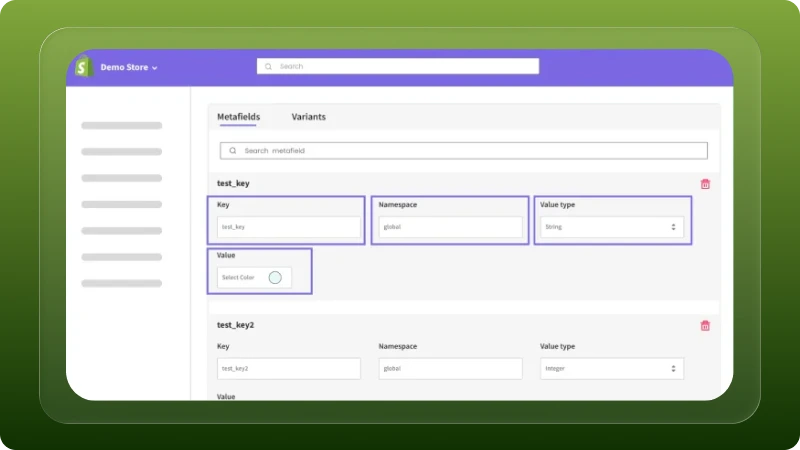
Every product, collection, or page usually needs more information than Shopify’s default fields can handle. A simple title and description aren’t enough once your catalog starts getting more detailed.
Think about it practically. A supplement brand needs structured data like ingredients, dosage, and certifications. A fashion store needs fabric details, size guides, and care instructions. A B2B store often needs technical specifications, downloadable documents, or bulk pricing information.
When this kind of data isn’t structured properly, stores start compensating in messy ways. Product descriptions get overloaded with information they weren’t meant to hold. Sections get hardcoded into the theme for specific products. Teams end up duplicating templates just to handle slight variations. And even small updates start requiring developer involvement.
This is exactly the gap metafields are meant to fill. They allow you to store information in a structured way so your theme can use it intelligently. But that only works if they’re planned and organized properly; otherwise, you’re just moving the mess somewhere else.
Step 1: We Start With Data Modeling (Not Development)
Most implementations go wrong right at the start. Developers jump into creating metafields without thinking about the structure behind them.

That’s where problems begin. Before we create anything, we take a step back and map the data. We look at what actually needs to be stored and how it will be used across the store. What information changes from product to product? What stays consistent? What should your team be able to update without touching code? And what needs to scale as your catalog grows?
This process is essentially data modeling; not in a complex, technical sense, but in a practical, business-focused way. You’re defining how your store’s information is organized before you build on top of it.
A simple example will make this clear. For a sports equipment brand, instead of creating vague fields like spec1, spec2, or extra_info, we break things into meaningful groups. Specifications might include weight, material, and dimensions. Performance could cover skill level or usage type. Content might include FAQs, videos, or downloadable manuals.
Now every piece of data has a clear purpose and a predictable place.
This kind of structure might feel like extra effort upfront, but it’s what prevents confusion later. Without it, metafields quickly become inconsistent and hard to manage. With it, everything else from theme development to content updates becomes much easier and far more scalable.
Step 2: Use Shopify’s Native Metafield Definitions Properly
Shopify’s metafield system has come a long way. You’re no longer working with loose key-value pairs; you now have structured definitions, proper field types, validation, and direct integration with the admin and theme editor.

On paper, that solves a lot of problems, but most stores still don’t use it properly in practice.
The common issue is simple: field types are chosen for convenience, not for how the data will actually be used. Everything ends up as a basic text field, even when the data is clearly structured or repeatable. It works initially, but becomes difficult to manage, harder to display cleanly, and almost impossible to scale.
We approach this more deliberately. If a piece of content repeats, we structure it as a list instead of cramming it into a single field. If something needs to connect to another product, collection, or structured content, we use references instead of duplicating data. Files like manuals or spec sheets are stored properly, not linked awkwardly through text. And rich text is used sparingly, only where formatting is genuinely required.
These decisions might seem small, but they directly affect how flexible your store is later. When your data is typed and structured correctly, your theme can use it more intelligently, your team can manage it more easily, and you avoid having to rebuild things as your requirements grow.
Step 3: We Use Metaobjects for True Scalability
Metafields work well when you’re attaching data directly to a product or a page. But the moment you need the same structured content in multiple places, metafields alone start to fall short.
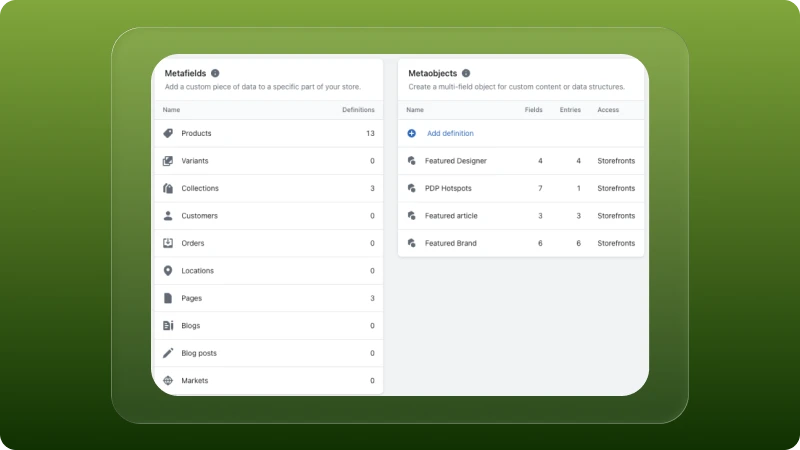
That’s where metaobjects come in. A simple way to think about it: if metafields store data on something, metaobjects store data independently so it can be reused anywhere.
This is a key difference, and it’s where most “dynamic” builds either scale properly or start breaking down.
We use metaobjects whenever content needs to be reused or managed centrally. This includes things like FAQs, ingredient lists, feature blocks, or any structured content that shouldn’t be duplicated across products. It’s also especially useful when non-technical teams need to manage content without worrying about where it’s being used.
Take FAQs as an example. Instead of adding separate FAQ metafields to every product, we create a structured FAQ setup with fields like question, answer, and category. Each product then simply links to the relevant entries.
The impact is immediate. You’re no longer repeating the same data across multiple products. Updates happen in one place and reflect everywhere. The admin experience stays clean, and your content remains consistent.
This is what actually makes a store scalable: not just adding more data, but structuring it in a way that avoids duplication and keeps everything manageable as the store grows.
Step 4: Theme Architecture – Making It Dynamic
Metafields give you structured data, but they don’t automatically make your store dynamic. That only happens when your theme is built to use that data properly.
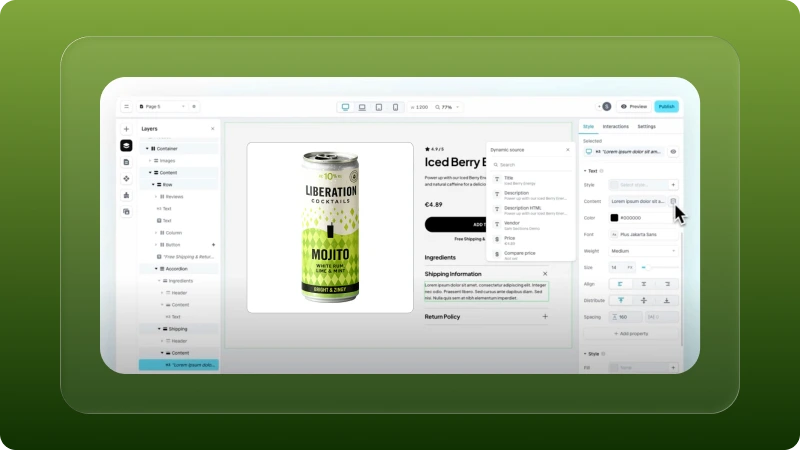
This is where a lot of builds fall short. The data might be there, but the theme is still rigid, built around fixed layouts or product-specific templates.
We approach it differently. Instead of hardcoding layouts for different product types, we build themes that respond to the data available. Sections are designed to pull from metafields, and they only appear when relevant data exists.
In practical terms, this means you don’t end up creating multiple templates just to handle small variations. You work with a single flexible template that adapts on its own. If a product has a size guide, that section shows up. If there’s a video, it gets rendered. If certain data isn’t present, the layout simply skips it without breaking.
This kind of setup keeps your store much easier to manage. You’re not maintaining multiple versions of the same template, and you’re not relying on developers every time something changes.
More importantly, it gives you a structure that can grow with your catalog without needing to be rebuilt every few months.
Step 5: Naming Conventions (This Is Where Most Stores Break)
This part doesn’t get much attention, but it’s one of the biggest reasons metafield systems fail over time.

When naming isn’t consistent, things quickly become hard to understand, harder to maintain, and almost impossible to scale. What starts as a few quick fields turns into a messy structure that no one wants to touch later.
We avoid that by being intentional from the start. Every metafield follows a clear, namespace-based structure. Instead of vague or random names, fields are grouped logically; something like custom.specifications.weight or custom.performance.skill_level. This makes it immediately clear what the field is for and where it belongs.
At the same time, we make sure the labels inside the Shopify admin are human-readable. Your team shouldn’t have to decode technical names just to update product data.
Consistency is key here. The same naming logic is applied across products, collections, and other entities, so the system feels predictable no matter where you’re working.
It might seem like a small detail, but it has a big impact. Developers can understand the structure instantly, your team can work without confusion, and future integrations don’t break because of unclear or inconsistent field names.
Step 6: Performance Considerations (Often Ignored)
A dynamic store should still feel fast.

That sounds obvious, but performance is one of the first things to suffer when metafields are added without structure. The issue usually isn’t metafields themselves; it’s how they’re implemented.
We’ve seen stores slow down because too much data is being pulled into a single template, rich text is being overused for content that should be structured, or large files are being referenced without any thought to how they load on the frontend.
These are small implementation decisions, but they add up quickly. The way we avoid that is simple: only load what the template actually needs. Keep the data structure clean, so Liquid isn’t doing unnecessary work. Handle media properly so heavier assets don’t block page performance.
The goal isn’t just to make the store dynamic; it’s to make it dynamic without adding unnecessary weight. Because flexibility matters, but speed still matters just as much.
Step 7: Making It Non-Technical Team Friendly
A dynamic store only works if the people managing it can actually use it.

This is where a lot of technically solid builds fall apart. The backend may be structured well, but if the admin experience is confusing, your team still ends up relying on a developer for simple updates.
That defeats the point. We build metafield systems with the assumption that the people using them every day won’t be developers. It’s usually someone in marketing, operations, or merchandising and the setup needs to make sense to them immediately.
That means fields are labeled clearly, grouped logically, and written in plain language. Inputs should feel intuitive, and no one should need technical context just to update product content.
When this is done properly, your team can manage the store confidently without second-guessing what each field does or where something belongs.
And that’s what makes the system practical not just technically well-built, but actually usable day to day.
Real Outcome: What This Actually Enables
When metafields are structured properly, the biggest change isn’t just cleaner data; it’s how much easier the store becomes to grow.
You can introduce new product types without rebuilding templates. You can manage content across large catalogs without duplicating work. Product pages can adapt based on what each item actually needs, instead of forcing everything into the same rigid layout.
It also reduces how often your team needs developer support. Small content changes, product updates, and structural additions become much easier to manage internally because the system is already built to handle them.
Just as importantly, it keeps the storefront consistent as the catalog expands. The experience stays organized, even when the complexity behind it increases.
That’s the real difference. It’s what separates a Shopify store that simply looks good from one that’s actually built to scale.
Final Thought
Most Shopify stores don’t struggle because of design. They struggle because the structure underneath isn’t built to support growth.
When metafields are added without a system, even simple updates become harder than they should be. Content gets messy, templates become difficult to maintain, and scaling the store starts creating more friction than momentum.
But when your metafields, metaobjects, and theme architecture are all working together, that changes quickly.
Content becomes easier to manage, the storefront becomes more flexible, and scaling new products or categories stops feeling like a rebuild every time.
Thinking About Building a Truly Dynamic Shopify Store?
If you’re planning to scale your store, add complex product data, or reduce ongoing development dependency, the way your metafields are structured will directly impact how far you can go.
→ If you want a Shopify store that’s flexible, scalable, and built for real-world operations, explore our Shopify development services.